Showing posts with label iphone. Show all posts

Tuesday, October 13, 2015

Best Cases to Show Off Your Rose Gold iPhone

2015, new iPhone, new color, Rose Gold.  Here are some of the best cases that I have come across to display the new Rose Gold iPhone.


Manufacture: Spigen
Model: Neo Hybrid EX
Retail: $34.99
Link: http://www.spigen.com/collections/iphone-6s/products/iphone-6s-case-neo-hybrid-ex?variant=5259966017
Comments: Clear case to really show off the Rose Gold color.


Manufacture: Spigen
Model: Ultra Hybrid
Retail: $24.99
Link: http://www.spigen.com/collections/iphone-6s/products/iphone-6s-case-ultra-hybrid?variant=5259886913

Comments:  Slightly different from the one pictured above, transparent all around.


Manufacture: Spigen
Model: Style Armor
Retail: $29.99
Link: http://www.spigen.com/collections/iphone-6s/products/iphone-6s-case-style-armor?variant=6302247873

Comments: Case matches the Rose Gold color but doesn't truly display the back of the iPhone.


Manufacture: Spigen
Model: Thin Fit
Retail: $14.99
Link: http://www.spigen.com/collections/iphone-6s/products/iphone-6s-case-thin-fit?variant=6352983041
Comments: Similar to the one above except fully Rose Gold.


Manufacture: Spigen
Model: Tough Armor
Retail: $34.99
Link: http://www.spigen.com/collections/iphone-6s/products/iphone-6s-case-tough-armor?variant=5904808705

Comments: Adds protection in exchange for color visibility.  Case does match the Rose Gold color.

Manufacture: Ringke
Model: FUSION
Retail: $10.99
Comments: Clear TPU case with port covers.

Wednesday, October 7, 2015

How to Determine Which A9 Chip Is In Your iPhone

*UPDATE*  Apple has given a statement to TechCrunch saying that the actual difference is around 2-3% based on internal testing.  This difference can vary between all iPhones, with the same parts, regardless of chip.  Also worth noting, the app listed below has apparently been removed from the AppStore.

If you haven't heard by now there is some drama building up regarding which A9 chip in the new iPhones is better.  This year it was dual sourced from both TSMC and Samsung.  Early reports suggested that the Samsung chip would be the superior chip due to the smaller size and, well, Samsung.

Recently stories have been circulating that the TSMC A9 chip is actually the superior chip.  Although bigger in size, it is apparently more efficient and has the potential to increase battery life by up to 20% (still being tested).  But if you are curious as to which A9 chip is in your iPhone you can head over to the AppStore and download Lirum Device Info Lite.  Once downloaded, open the app and compare the Model number to the ones listed below:

N66AP (6s plus) or N71AP (6s) - Samsung chip
N66MAP (6s plus) or N71MAP (6s) - TSMC chip


It has been reported that if you have a 6s you have a higher chance of having the TSMC while the 6s+ has a higher chance of having the Samsung chip.

Monday, October 5, 2015

iPhone 6s/6s+ Insurance Options


You just picked up the latest tech from Apple and now you want to add some insurance just in case an accident occurs.  The devices are costly themselves and can be costly to repair or replace so let's talk about some of the options you have when it comes to getting insurance for your new iPhone.

Applecare+ Insurance
-----------------------------------
Apple offers it's own insurance that covers your phone for 2 accidental incidents and extends your mechanical warranty by an additional year.  The bad news is that this year the price jumped from $99 to $129 for the insurance plan and the deductible jumped from $79 to $99.  They do not cover loss and theft, but they probably provide one of the better services since you are dealing with the source.

If you decide to use Apple's Upgrade Program which they introduced this year then Applecare+ is already included in the monthly cost of the device.

Initial Cost: $129 (2 years)
Deductible: $99 per claim (max 2)

Pros:
+ Great support w/Apple
+ Cheaper than carrier insurance

Cons:
- Price increase this year on the warranty and deductible, $129 and $99 respectively.
- Covers only up to 2 accidental incidents
- Theft/Loss not included

Carrier Insurance
-----------------------------------
Let's be honest here, the insurance plans offered by the carrier's are quite expensive compared to other options that are available.  The benefit they offer over the competition is that they cover theft and loss.  But if you don't plan on losing your phone or if theft is not an issue (knock on wood) I would look elsewhere.  The image at the end of the article doesn't include T-Mobile.  T-Mobile costs $8 per month ($192/year) for the insurance, limited to 2 accidental incidents per 12 months, with a $175 deductible.

Initial Cost: $192+ (over 24 months and depends on carrier)
Deductible: $175+ per claim (depends on carrier)

Pros:
+ Theft/Loss included

Cons:
- Most expensive option
- High deductible
- Carrier repair limitations

Squaretrade Insurance
-----------------------------------
Squaretrade is very popular and has been around for quite a while.  They are by far one of the most well known insurance providers and are quite affordable.  A 2 year plan starts at $99 and a 3 year starts at $129, both one time payments.  They also offer a monthly plan which is $8 a month.  The great news is that the deductible is only $75 per claim.

Initial Cost: $99 (2 years)
Deductible: $75 per claim

Pros:
+ Affordable
+ Cheapest option listed

Cons:
- Theft/Loss not included

ProtectYourBubble Insurance
-----------------------------------
I recently came across a new insurance provider which is similar to Squaretrade.  It is the same provider that is used by T-Mobile.  The cost to insure the first device is $5.99, second device is $4.99, and then it is $3.99 for every device after that.  So if you want to insure more than one device then this might be a better option.  The deductible is also $75 per claim for smartphones.

Initial Cost: $144 (1 device/2 years)
Deductible: $75 per claim (unlimited claims)

Pros:
+ Affordable
+ More devices insured, cost per item decreases.

Cons:
- Theft/Loss not included


*T-Mobile is $8 per month ($192/year), 2 accidental incidents per 12 months, with a $175 deductible and covers Loss & Theft protection.

Tuesday, November 18, 2014

Should you get a white or black iPhone 6/6+?

My smartphone journey began with iOS, then I spent a few years with Android, but have been thinking about going back to iOS with the release of the iPhone 6/6+.  I couldn't decide which color, black or white, I wanted so I decide to do a little research and compare them on my own.


Black
Pros:
Clean front when device is off
Speaker/front facing camera/proximity sensor not visible
Bezels "disappear" when viewing media

Cons:
Fingerprints are more visible on the bezel
Reflections are easier to see along the bezel
Applications don't look as good with black
Only comes in Space Gray


White
Pros:
White bezels gives a cleaner look
Applications seem to look better with the white bezels
Fingerprint sensor has a colored ring surrounding it making it look more premium
Two toned look when the screen is off looks good
Comes in Silver or Gold

Cons:
Speaker/front facing camera/proximity sensor visible
White bezel might be distracting when viewing videos
White bezels may project more light reflection

Sunday, January 5, 2014

iPhone 4S Stuck Volume Up Button

A relative wanted me to look at her iPhone 4S to see if I could fix the volume up button which was stuck.  I first took it in to an Apple Store to see if they could fix it on the cheap, but after making an appointment and hours later I was told that it could not be fixed and that I would have to pay $199 to swap it out.  

I read about a shim that they could install, but was told that it was only to fix buttons that were not responding correctly, not ones that were stuck.

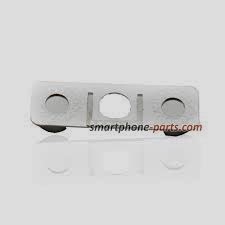
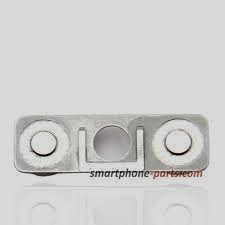
So instead of spending $199 I decided to try and fix it myself and I'm glad I did.  After buying the necessary tools to open up the iPhone the fix was quite simple.  One tiny disc that rests behind the volume up button was off center and therefore it was causing the button to stick.  After a drop of super glue and centering this tiny metallic disc it works.  I don't know how long it will last but I spent only $5 for the tools and super glue.  Here are 2 pictures I found online, one without the discs and the other with.  My part looked more like the right one.

As you can see that without the discs there is a hole which prevents the button from working properly.  I don't know why they designed it like this but they did.

So if your volume button is stuck just buy a new one online but make sure it's raised in the center of each button or else it will most likely not work.  If the volume buttons are working, just not properly, try googling about a shim which Apple does install, so don't take no for an answer.

Tuesday, December 31, 2013

How to Transfer Photos & More From Your iPhone

I recently gave my mom my older phone but I wanted to make sure everything was kept the same, specifically the photos.  Unfortunately the computer she used to sync it with was not at the house so I had to find a solution online.  There were a couple of solutions, some straight from Apple, but didn't completely answer my question.

If you want to transfer the camera roll from your iPhone you can do that without any additional software (Apple Knowledge Base Article).  They have guides for Mac and Windows.

The limitation here is that it does not import other photos that you might have, such as albums, which is what I really needed.

There are a few applications out there but I decided to use DiskAid for Mac.  It's not free, and honestly is on the expensive side, but it did do the job and there is a Windows version if needed.  It's not limited to just importing photos, you can do videos, music, messages,  contacts, etc.

But in my case I just wanted to get the photos off of the phone and on to my computer so I could backup the phone, restore it to factory settings, and then restore from backup.

Besides having to authorize my computer everything went pretty smoothly.  I backed up the contacts to iCloud and iTunes took care of the rest.  After it is all said and done I was able to restore all the apps, photos (iTunes backs up the camera roll), contacts, messages, etc.

Other Apps:

Swiss Army Knife (does practically everything):
DiskAid (Windows/Mac)
iExplorer (Windows/Mac)

Music Only:
Senuti (Mac)
Sharepod (Windows/Mac)